
As senior .NET developers, we’ve all used ***async/await ***as the go-to pattern for handling asynchronous operations. It’s Clean, Intuitive, and makes our code more Maintainable. However, beneath this great syntax lies a complex machinery that can drastically impact application performance when misused.
this article going to uncover the hidden costs and explore optimization strategies that every seasoned developer should know.
Table of Contents
- Understanding the Foundations
- Making Your Code Faster: ValueTask
- Performance Tips ✓
- Practical Advice for Different Situations
- Conclusion
BEFORE WE GO :
Friendly Link for my brothers: https://medium.com/@isitvritra101/performance-costs-of-async-await-in-net-what-senior-developers-need-to-know-185ab74c7acb?sk=6bdd986c86fa9ffa4550f0262d106cbd
Understanding the Foundations
The async/await pattern in .NET fundamentally transforms how we write asynchronous code. Before we learn about advanced patterns, let’s understand what happens under the hood when we write async code.
What Actually Happens Behind the Scenes?
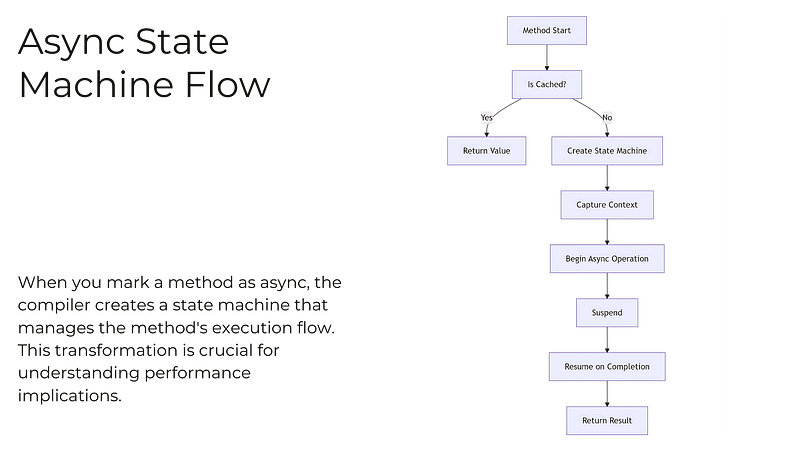
When you mark a method as async, .NET does something interesting. It takes your code and transforms it into a special structure called a “state machine.”
Think of it like breaking your code into smaller pieces that can be paused and resumed.
Yes, What you write is
public async Task ProcessOrderAsync()
{
    var data = await GetDataAsync();       // Step 1
    var result = await ProcessDataAsync(data); // Step 2
    return result;
}
But, What it becomes (simplified)
public Task ProcessOrderAsync()
{
    // Creates a structure to keep track of where we are
    var stateMachine = new AsyncStateMachine();

    // Stores any local variables
    stateMachine.data = null;
    stateMachine.result = 0;

    // Starts the process
    Start(stateMachine);

    // Returns a Task that will eventually have the result
    return stateMachine.Task;
}
Why This Matters ( Performance Impact )
This transformation has some costs:
-
Memory Usage: Every async method needs extra memory to:
-
Store the state machine
-
Keep track of local variables
-
Create Task objects
2. Speed: There’s some extra work happening:
- Setting up the state machine
- Switching between different parts of your code
- Managing all these pieces
look at this..
//Simple but might be wasteful
public async Task GetValueAsync()
{
    return await Task.FromResult(42);
}

//More efficient for simple cases
public Task GetValueBetter()
{
    return Task.FromResult(42);
}
In the first version, we’re creating a state machine we don’t really need. The second version is more efficient because it just returns the result directly!!
see! async/await is the root right? but remember its important but not necessary to use everywhere! we can optimize…
Making Your Code Faster: ValueTask
Now, let’s talk about ValueTask. Think of it as a more efficient version of Task for specific situations. Here’s when you might want to use it:
YES,
// Before: Using regular Task
public async Task GetDataAsync(string key)
{
    var value = await _database.GetValueAsync(key);
    return value;
}
BUT,
// After: Using ValueTask efficiently
public ValueTask GetDataAsync(string key)
{
    // If we have it in cache, return immediately
    if (_cache.TryGetValue(key, out var value))
    {
        return new ValueTask(value);
    }

    // If not in cache, fall back to async operation
    return new ValueTask(_database.GetValueAsync(key));
}
When should you use ValueTask?
- When your method often returns immediately without waiting
- When you’re dealing with lots of small, fast operations
- When you’re building high-performance systems
📍Don’t use ValueTask just because it sounds better. It’s actually worse for performance if used incorrectly!
Times up!
— Performance Tips ✓
0️⃣Don’t Use Async When You Don’t Need It
// Don't do this
public async Task AddNumbers(int a, int b)
{
    return await Task.FromResult(a + b); // Why async?
}

// Do this instead
public int AddNumbers(int a, int b)
{
    return a + b; // Simple and fast!
}
1️⃣Handle Multiple Operations Smartly
// Less efficient: doing things one at a time
public async Task ProcessItems(List items)
{
    foreach (var item in items)
    {
        await ProcessItemAsync(item); // One at a time
    }
}

// More efficient: processing things together
public async Task ProcessItems(List items)
{
    var tasks = items.Select(item => ProcessItemAsync(item));
    await Task.WhenAll(tasks); // All at once!
}
2️⃣Use Caching When Possible
private readonly Dictionary> _cache = new();

public async Task GetExpensiveData(string key)
{
    if (!_cache.TryGetValue(key, out var task))
    {
        task = CalculateExpensiveDataAsync(key);
        _cache[key] = task;
    }
    return await task;
}
3️⃣Thread Pool and Why It Matters
The thread pool is like a team of workers ready to handle your async operations. Sometimes you need to help it work better:
public void ConfigureThreadPool()
{
    // Get current settings
    ThreadPool.GetMinThreads(out int workerThreads, out int completionPortThreads);

    // Increase minimum threads if you need more workers
    ThreadPool.SetMinThreads(
        workerThreads * 2,
        completionPortThreads
    );
}
but remember When should you adjust thread pool settings?
- When your application handles lots of requests
- When you see operations waiting too long to start
- When you have many concurrent async operations
4️⃣Common Mistakes to Avoid
- Async Void
// Bad: Can't handle errors properly
public async void ProcessData() // 🚫
{
    await Task.Delay(100);
}

// Good: Returns Task so errors can be handled
public async Task ProcessData() // ✅
{
    await Task.Delay(100);
}- Unnecessary Async
// Bad: Wasteful async overhead
public async Task GetNumber() // 🚫
{
    return await Task.FromResult(42);
}

// Good: Direct return when no real async work
public int GetNumber() // ✅
{
    return 42;
}
Remember these points:
- Start with clear, simple async code
- Measure performance in your real application
- Optimize only when you have a real problem
- Test your optimizations with real data
Practical Advice for Different Situations
For Web APIs:
public async Task GetUserData(int userId)
{
    // Try cache first (fast path)
    if (_cache.TryGetValue(userId, out var userData))
    {
        return Ok(userData);
    }

    // If not in cache, get from database
    userData = await _database.GetUserAsync(userId);

    // Save in cache for next time
    _cache.Set(userId, userData, TimeSpan.FromMinutes(10));

    return Ok(userData);
}
For Background Processing:
public async Task ProcessQueue()
{
    while (!_cancellationToken.IsCancellationRequested)
    {
        // Process items in batches for better performance
        var items = await _queue.GetItemsBatchAsync(maxItems: 100);

        // Process batch together
        await Task.WhenAll(items.Select(ProcessItemAsync));

        // Short delay to prevent tight loop
        await Task.Delay(100);
    }
}
**For UI: **SynchronizationContext
Understanding SynchronizationContext is crucial for application performance, especially in UI applications:
public class SynchronizationContextExample
{
    public async Task UIOperation()
    {
        // Captures UI context
        var currentContext = SynchronizationContext.Current;

        await Task.Run(() =>
        {
            // Heavy work on background thread
        }).ConfigureAwait(false); // Avoids context switch back to UI

        // Manual context restoration if needed
        if (currentContext != null)
        {
            await currentContext.PostAsync(() =>
            {
                // UI update
            });
        }
    }
}- Use ConfigureAwait(false) in library code
- Be cautious with context switches in performance-critical paths
- Understand the cost of context capture and restoration
Conclusion
The best way to learn is to:
- Write the simplest code that works
- Measure its performance
- Ask for help when you find specific problems
- Learn from real examples in your codebase
premature optimization is still the root of all evil. Profile your application under real-world conditions, identify issues, and apply these optimizations where they matter most!
Before GTA6
Tags
#dotnet #csharp #programming #software-development #async #performance
Follow and Clap!!!

